class: center, middle, inverse, title-slide # GGsignif ## Final Presentation ### Ana Lakshin ### 05/15/19 --- class: center # What is GGsignif? -- - GGplot 2 is a popular plotting package used for data visualization. -- - GGplot uses a layering mechanism to achieve professional looking graphs. -- - GGsignif is a package that acts as a layer for GGplot. --- #How do you use GGsignif? - 1st: load both packages. ```r library(ggplot2) library(ggsignif) ``` -- - 2nd: Plot your data using GGplot2 and add layer 'geom_signif'. ```r all.data<- CO2 library(dplyr) All.data <- all.data %>% select(Type,Treatment,conc,uptake) ggplot(All.data, aes(x=Type,y=uptake,group=Treatment))+ geom_boxplot()+ geom_signif(comparisons = list(c("Quebec","Mississippi")), map_signif_level = TRUE) ``` <!-- --> --- class: center #How do you use GGsignif? <!-- --> --- class: center ```r ggplot(All.data, aes(x=Type,y=uptake,group=Treatment))+ geom_boxplot(fill = 'green')+ geom_signif(comparisons = list(c("Quebec","Mississippi")), map_signif_level = TRUE)+ theme_classic(base_size=18) ``` <img src="GGsignif_presentation_files/figure-html/unnamed-chunk-4-1.png" style="display: block; margin: auto;" /> - The first input delineates which values need to be calculated for annotation i.e. comparison = list(c(here is where enter those values)). 'Map_signif_level' is used to control whether the output graph contains the actual signficance or stars (***). --- class: inverse, center, top #What are the advanced options? - With GGsignif you are able to control every detail of the annotation. -- - Here are some examples: --- #Advanced graph ```r dataf<- data.frame(Group<- c("G1","G1","G2","G2"), Subject<- c("A","B","A","B"),Score<- c(5,7,20,25)) ggplot(dataf, aes(Group,Score))+ geom_bar(aes(fill = Subject), stat = "identity", position = "dodge", width = .5)+ geom_signif(y_position = c(7.3,25.3), xmin = c(0.8,1.8), xmax = c(1.2,2.2), annotation = c("NS","**"), tip_length = 0)+ geom_signif(comparisons = list(c("G1","G2")), y_position = 28, tip_length = 0, vjust = .1) ``` 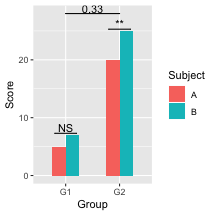<!-- --> -- Now lets break this down --- # With GGsignif you can change... ## 'y_position' The placement of each individual groups' signficance annotation : y_position = c(height of first annotation, second annotation height on y-axis). ```r ggplot(dataf, aes(Group,Score))+ geom_bar(aes(fill = Subject), stat = "identity", position = "dodge", width = .5)+ geom_signif(y_position = c(10,20), xmin = c(0.8,1.8), xmax = c(1.2,2.2), annotation = c("NS","**"), tip_length = 0)+ geom_signif(comparisons = list(c("G1","G2")), y_position = 30, tip_length = 0, vjust = .1)+ theme_bw(base_size = 13) ``` <!-- --> --- <img src="GGsignif_presentation_files/figure-html/unnamed-chunk-7-1.png" style="display: block; margin: auto;" /> --- # With GGsignif you can change... ## 'xmin' and 'xmax' - The two work together to set the length of the annotation bar where the first number within xmin's paranthesis is the starting point and the first number in xmax is the end. In the first graph xmin = c(.8,1.8) and xmax = c(1.2,2.2), this means the first bar starts on the x-axis at .8 until 1.2 and the second bar's length is from 1.8 to 2.2. - It can also be made shorter or longer: ```r ggplot(dataf, aes(Group,Score))+ geom_bar(aes(fill = Subject), stat = "identity", position = "dodge", width = .5)+ geom_signif(y_position = c(7.3,25.3), xmin = c(0.6,1.9), xmax = c(1.4,2.1), annotation = c("NS","**"), tip_length = 0)+ geom_signif(comparisons = list(c("G1","G2")), y_position = 28, tip_length = 0, vjust = .1)+ theme_bw(base_size = 13) ``` <!-- --> --- <img src="GGsignif_presentation_files/figure-html/unnamed-chunk-9-1.png" style="display: block; margin: auto;" /> --- # With GGsignif you can change... ## 'annotation' Here is where you type in the desired text or symbol for each bar. ```r ggplot(dataf, aes(Group,Score))+ geom_bar(aes(fill = Subject), stat = "identity", position = "dodge", width = .5)+ geom_signif(y_position = c(7.3,25.3), xmin = c(0.8,1.8), xmax = c(1.2,2.2), annotation = c("Annotation","How i want it"), tip_length = 0)+ geom_signif(comparisons = list(c("G1","G2")), y_position = 28, tip_length = 0, vjust = .1)+ theme_bw(base_size = 13) ``` <!-- --> --- <img src="GGsignif_presentation_files/figure-html/unnamed-chunk-11-1.png" style="display: block; margin: auto;" /> --- # With GGsignif you can change... ## 'tip_length' This gives the option to add vertical lines coming down on both ends of annotation bar of varying length. ```r ggplot(dataf, aes(Group,Score))+ geom_bar(aes(fill = Subject), stat = "identity", position = "dodge", width = .5)+ geom_signif(y_position = c(7.3,25.3), xmin = c(0.8,1.8), xmax = c(1.2,2.2), annotation = c("NS","**"), tip_length = .1)+ geom_signif(comparisons = list(c("G1","G2")), y_position = 28, tip_length = 2.5, vjust = .1)+ theme_bw(base_size = 13) ``` <!-- --> --- <img src="GGsignif_presentation_files/figure-html/unnamed-chunk-13-1.png" style="display: block; margin: auto;" /> --- # With GGsignif you can change... ## 'vjust' This option allows user to control placement of the "0.33" in the graph. ```r ggplot(dataf, aes(Group,Score))+ geom_bar(aes(fill = Subject), stat = "identity", position = "dodge", width = .5)+ geom_signif(y_position = c(7.3,25.3), xmin = c(0.8,1.8), xmax = c(1.2,2.2), annotation = c("NS","**"), tip_length = 0)+ geom_signif(comparisons = list(c("G1","G2")), y_position = 28, tip_length = 0, vjust = 6)+ theme_bw(base_size = 13) ``` <!-- --> --- <img src="GGsignif_presentation_files/figure-html/unnamed-chunk-15-1.png" style="display: block; margin: auto;" /> --- #What are the Pros and Cons? .pull-left[ ## Pro - Relatively easy, although it definitely entails a learning curve. - Able to control many features using advanced options. - Works well with GGplot2 ] .pull-right[ ## Con - Automatic version ("map_signfificance_level") is not always correct, uses wilcox test to calculate significance. ] --- #References 1. ggsignif intro. (n.d.). Retrieved May 13, 2019, from https://cran.r-project.org/web/packages/ggsignif/vignettes/intro.html 2. ggsignif package | R Documentation. (n.d.). Retrieved May 13, 2019, from https://www.rdocumentation.org/packages/ggsignif/versions/0.5.0